Cricket Scoring Guide
Use this guide when scoring school games, street matches, practice sessions, and club fixtures. It walks through every scoring decision that matters during a live innings — from the first ball to the final target — and links out to the rules, formats, and stats that sit behind those decisions.
Before the first ball
Confirm the match format, total overs, batting team, fielding team, opening batters, and first bowler before scoring starts. A clean setup prevents most local-match scoring mistakes. If your group is unsure which rules apply — overs per bowler, powerplays, or wide limits — check the Cricket Rules Guide before the toss so the scorer and both captains start from the same page.
Legal deliveries and overs
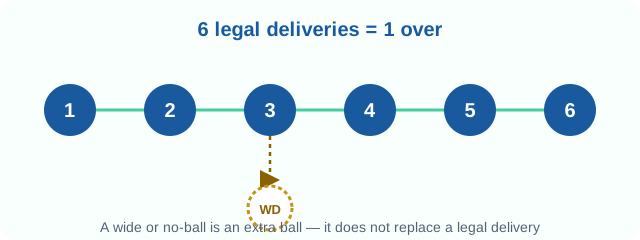
A standard cricket over has six legal deliveries. Wides and no-balls add runs but do not count as legal balls, so the over continues until six legal deliveries are recorded. The diagram below shows why an over with one wide still needs six legal balls bowled before the bowler changes ends.
Runs and strike rotation
Singles, threes, and most odd-numbered running scores rotate the strike. Boundaries and even-numbered running scores usually keep the same batter on strike unless the over ends. For example, a batter who takes a single off the fifth ball faces the strike again only if the batters cross back on the sixth ball — otherwise the non-striker plays the last ball, and the strike then rotates again for the new over regardless of how that final ball is scored.
Extras explained
Wides and no-balls are added to the team total as extras and do not count as legal deliveries, so the bowler must send down another ball to complete the over. Byes and leg-byes are also extras, but unlike wides and no-balls they do count as legal deliveries because the batter had a fair chance to play the delivery. Mixing up this distinction is one of the most common sources of over-counting mistakes in local scoring, since it throws off both the over count and the bowler's figures at the same time.
Advanced wide and no-ball scoring
In Cricket Score Counter, you can long press the WD (Wide) button to record additional runs scored on the same delivery. This makes it easy to score situations such as a wide ball that goes for multiple runs, or a no-ball that also results in extra runs off the bat — both amounts are added in one action instead of two separate entries.
How the format changes what you watch for
T20, 50-over, and Test-length matches all use the same scoring rules, but a scorer's priorities shift with the format. Short formats compress pressure into a handful of overs, so current run rate and required run rate swing quickly and need updating after every ball. Longer local formats leave more room to recover from a slow start, but make it easier to lose track of overs bowled per bowler if your group enforces a bowler limit. If you are setting up a match and are not sure which format fits, the Cricket Match Formats guide compares overs, bowler limits, and typical scoring patterns across formats.
Reading the scorecard while you score
A live scorecard is more than a total. Current run rate (CRR) shows how quickly the batting team is scoring right now, and required run rate (RRR) shows how quickly they need to score to reach the target. Strike rate and economy rate show how a specific batter or bowler is performing compared with the team average, and the extras column separates deliveries the batter did not control from runs they scored themselves. Keeping these numbers accurate as you score is what makes the post-match scorecard trustworthy — the Cricket Statistics Guide breaks down exactly how each of these numbers is calculated.
Wickets and how each dismissal is scored
Record the wicket type as soon as it happens, since each dismissal affects the batting and bowling scorecards differently:
- Bowled — credited to the bowler; the delivery must be legal.
- Caught — credited to the bowler and the fielder; any runs completed before the catch still count.
- Run out — not credited to the bowler; check who was left short of their crease when the mistimed run happened.
- Stumped — credited to the bowler and the wicketkeeper, and applies when the batter is out of their crease off a delivery rather than while running.
- Hit wicket — credited to the bowler; the batter dislodges their own stumps while playing a shot or setting off for a run.
- Retired out — recorded as a wicket in the scorecard, unlike a batter who simply retires hurt or retires not out.
- LBW, obstructing the field, and timed out — rarer at local level, but still need a wicket recorded against the correct batter so the innings total stays accurate.
Targets and required run rate
In a chase, the target is one run more than the first innings total. Required run rate changes after every legal ball, so a live scorer should update it immediately rather than waiting until the end of an over. If overs are reduced for time or rain in a local match, agree on a simple revised target before the next over starts — most local games use a proportional adjustment rather than a full Duckworth-Lewis-style calculation, so make sure both teams agree on the method before continuing.
Live scoring and sharing
Once the match setup is complete, you can share the live score link with players, coaches, friends, and family. Every ball update is reflected instantly, allowing everyone to follow the match in real time.
Save matches and continue later
Logged-in users can save matches and access them from any device. This is useful for tournaments, practice matches, or long games where scoring may continue later or be managed by different scorers.
Common scoring mistakes and how to avoid them
A few small habits cause most of the scoring errors in local matches. Watch for these:
- Forgetting to record a wide or no-ball as an extra, which throws off both the team total and the over count.
- Losing track of which batter is on strike after an odd number of runs or after the over ends.
- Selecting the wrong bowler at the start of an over, which corrupts bowling figures for the rest of the innings.
- Waiting until after the next ball to record a wicket, which makes it easy to misattribute the dismissal.
- Not confirming the target and required run rate as soon as the second innings starts.
- Leaving corrections until after the innings ends, when the sequence of events is harder to remember accurately.
Match-day scorer checklist
- Keep team names short enough to read on phones.
- Use player names when you need batting and bowling scorecards.
- Long press WD button when additional runs are scored on the delivery.
- Review the recent events after every wicket or expensive over.
- Share the live link only after the match setup is complete.
- Save important matches to access them later from any device.
- Correct mistakes immediately so later stats stay trustworthy.
Why live scoring helps local cricket
A shared live score keeps players, viewers, and organizers aligned. It reduces score disputes, makes targets clear during a chase, and gives teams a useful summary after the match. Cricket Score Counter is built around that simple match-day need: enter each ball quickly, keep the scoreboard readable, and make the final score easy to trust.
Worked scoring examples
Example over: 0, 4, WD+2, W, 1, 2, 6
This over contains seven entries because the wide is not a legal delivery. The team scores 15 runs from the over: four, three wide-related runs, one, two, and six. The wicket is recorded on the legal delivery where it happened.
Chasing 82 in 8 overs
The target is 83. If the chasing team is 42/2 after 4 overs, they need 41 from 24 legal balls. The required run rate is 10.25 per over, so every dot ball and extra changes the pressure immediately.
Retired batter in a practice match
Many local games allow a batter to retire and return later. Agree on the rule before the toss. If the batter is retired out, record it as a wicket; if retired hurt or retired not out, keep it separate from normal dismissals.
Correcting a missed wide
If you realize a wide was recorded as a normal dot ball two deliveries later, fix the team total, the over's legal ball count, and the bowler's figures together. A single missed wide can otherwise make the over count and the run rate disagree for the rest of the innings.
Scorecard quality checks
- The total score should equal batter runs plus extras.
- Bowling overs should match the legal balls delivered.
- The striker after an over should be checked against the final run on the previous ball.
- A no-ball or wide should not reduce the remaining legal balls in the over.
- The target should always be one run more than the first innings total.
Quick answers before you start scoring
Do I need to add player names to score a match?
No — team totals work without players, but add names if you want batting and bowling scorecards.
Can I fix a mistake after the over has moved on?
Yes. Use undo or the recent events list as soon as you notice, and adjust the affected batter, bowler, and team totals together.
What happens if a delivery is both a no-ball and worth extra runs?
Record the no-ball and add any runs completed or conceded on the same ball. Long-press the relevant button in Cricket Score Counter to add both at once.
See the full FAQ for setup, sharing, and match history questions.